Create a future view [1]
- Post a future view [3]
- Save without publishing [12]
- Set rating selection [13]
- Save a revision [14]
- Save without publishing [12]
To post a new narrative, locate and click the Add content > Post a future view in the left column menu. There are many steps involved with posting a future view. There is more information below about how to fill in each of these sections.
Identify the type of future view
Check which type of future view you are posting. Please check only one unless you are combining two original works such as an original image combined with one of the written view types.
Give a title
Add any title you prefer.
The 'Body' section is where you paste the entirety of your story. There are a few best practices we suggest for this:
- Write your story using a trusted word processor.
- Pasting from Word can cause some formatting issues. Instructions for pasting from word are available in the next support section (below).
- Make certain to remove the reminder text "Paste your story here" before adding your story to this form.
Drupal provides an option which removes Word formatting form text to protect how your content appears on the web page.
Click the Paste from Word icon [3] to open a text form.
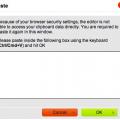
Paste your Word text into the form and click 'OK.'
Adding backlinks (and other links)
Backlinks provide the opportunity to trace a story's inspirations, possibly tracing ideas back through a chain of stories. Over time, being able to identify important original ideas could be as important as where we eventually get. There are two types of backlinks, internal and external.
- Make certain to remove the helper text in the form before adding your content.
Internal backlinks
- These identify Regarding Tomorrow stories, blog posts and forum discussions which inspire any part of your story.
- These should include the complete URL of the page where the story, post or forum is located.
- Links will look like http://www.regardingtomorrow.com/node/22 [16] or http://www.regardingtomorrow.com/story-name-here [17].
- An explanation may be provided for each, giving readers a better idea of how they developed into your story.
External backlinks
- These identify movies, shows, books, blog posts, comics, songs and any other ideas which inspire any part of your story.
- When possible, please link these to Amazon.com pages where readers can purchase something if the like. This site does incur some costs and this will help us offset these costs through our Amazon affiliate account.
- If Amazon.com links are not available or you would also like to include other pages (Wikipedia, home site - like a film's home page - or another article about the media) please bullet each individual page.
This is where the writer gets to explain their thoughts, process, likes/dislikes, and any other ideas that went into their story.
Since this site welcomes members as young as 15, marking content as explicit is a requirement or posting. Please consider the following when posting, in order to help you judge whether content contains explicit material and should be marked as such.
Profanity
- Cuss words do not automatically identify content as explicit.
- A long string of profanity may be explicit material, use your best judgement.
- Profanity used to describe people in a derogatory tone should be marked explicit.
- Profanity used to describe body parts should be marked explicit.
Sexual
- Sex in a story does not automatically identify content as explicit.
- Detailed description of sex should be marked as explicit.
- References to extreme or alternative sex should be marked as explicit.
- The best test for whether content is explicit or not is whether is sounds remotely like something you'd expect in a porn magazine article.
Violence
- Basic violence such as street fights or military conflict do not automatically identify content as explicit.
- Gory anatomical detail resulting from violence should be marked as explicit.
Other
- Use your best judgement for surgical scenes, threats in arguments and probably bad jokes.
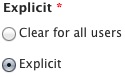
Each narrative scene MUST be marked as either clear or explicit. Click on the correct radio button before saving.
Choosing scene properties (terms)
There are three taxonomies connected with each story. These taxonomies include a series of terms which help readers identify content by these terms to find ideas they would like to read for pleasure or influence. It's important to flll these in as accurately as you can, so readers can find them via search filters.
Aspects of human existence
- These 21 terms refer to a range of common elements which seem consistent with humanity through time or will exist going into our future.
- Select all of the terms you believe are present in your story.
- If you feel there are any missing, please contact us [18]. This site should grow with the thoughts of our members, so any ideas are welcome.
Location of story
- These seven terms represent locations where your story could occur.
- Please check all of the locations where your story could play out. Some stories will involve several locations and some may include all of these.
Years into the future
- Simply select the range of years which represent your best guess how far out your story may occur.
- As with the others, you may select as many of these as you feel are appropriate.
Set rating selection
You have the option to turn off ratings (overall quality, writing quality, believability, originality) for each view. Simply uncheck the Enable Rating box. Please be aware that doing this will keep your story from appearing on 'best' lists.
At the bottom of create narrative scene page are a set of stacked tabs. Click on the Revision information tab.
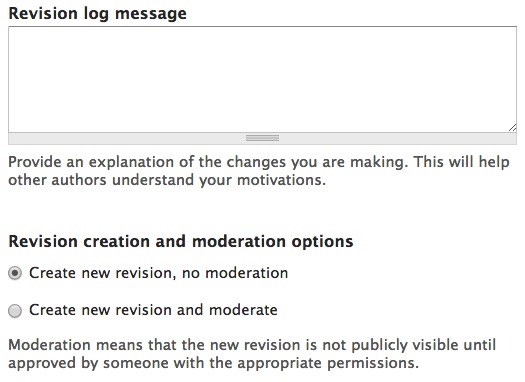
- To publish the current revision, select "Create new revision, no moderation."
- To save the current revision as a copy, but not publish, click Create new revision and moderate.
- You may enter notes for any revision in the Revision log message field.
To see the list of revisions for your work, open the page and click on the Revisions button  at the top of the screen. The status will show whether each revision is current and or archived. It will also show whether the revision is published.
- To select an older revision, click on the date links (07/05/2013 - 09:44) for example. This will open a view of the older revision.
- To update, click the Edit button
 . This will open an editable version.
 - When you save, select either modify current revision, no moderation or create new revision, no moderation and the copy you have open will publish.
To save without publishing, scroll to the bottom of the page and click on the Publishing Options tab.

Uncheck the Published checkbox.

Click Save.