Membership and community
 Printer-friendly version
Become a member | Multiple accounts | Invite a friend | Send a member a message
Become a member
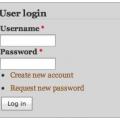
To become a member, click the Create new account link located in the User Login block on the bottom of the left column.
Multiple accounts
As a member, you are the core of the RT community. Members have the ability to post writing and images, comment on scenes and blog posts, and participate in forum conversations.
Pseudonyms and multiple accounts
Pen names are excellent ways to publish material as you hone your craft and ideas. Feel free to create and publish work from various accounts if this helps you feel more comfortable getting your ideas out and receiving feedback. Each account currently requires a different email address (I've found a workaround, but will take time to implement).
- Each gmail user gets two email addresses: name@gmail.com and name@googlemail.com. Both are delivered to the same inbox.
- Create an alias account using your.username+any.alias@gmail.com as a template. Details at https://support.google.com/mail/answer/12096?hl=en
If you know someone you'd like to invite to the site, an 'Invite a friend' block is located in the bottom left column and available once you log into the site - it replaces the login block after authentication.
Simply enter your friend's email address in the form. By default, the 'Request relationship is selected. This will confirm the friend request and accept it upon login.
Send a member a message via email
At the bottom of any narrative page, there is a Send author a message link. Clicking on this will open a email form to email the site member.